
Getting started with the Zoopit Time Tracker takes less than two minutes. Whether you are a driver setting it up for the first time or a fleet manager rolling it out across your team, this guide walks you through every step from download to your first tracked shift.
The Zoopit Time Tracker is built into the Zoopit GO driver app, which means there is no separate application to install. If your drivers already use Zoopit GO for route navigation and proof of delivery, time tracking is just one tap away.
Step 1: Download the Zoopit GO App
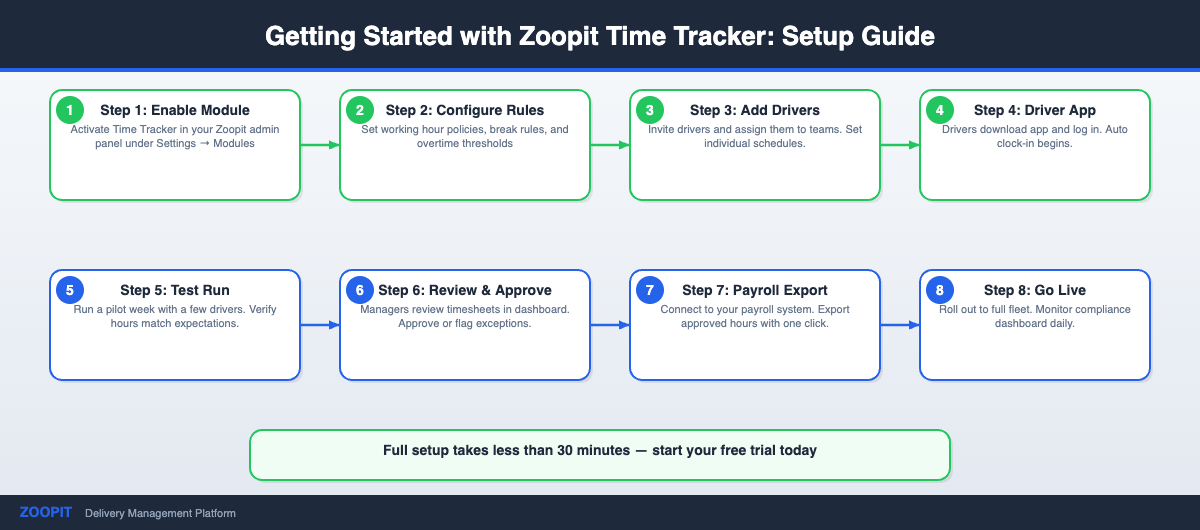
The Zoopit Time Tracker is available as a free download on both the Apple App Store and Google Play. Search for “Zoopit GO” or use the download links on our Time Tracking product page. The app works on any modern smartphone running iOS 15 or later, or Android 10 or later. You do not need any special hardware or equipment to get started.
Step 2: Create Your Account
Open the app and create an account with your work email address. If you are a fleet manager setting up the Zoopit Time Tracker for your drivers, you can create an organisation account from the Zoopit dashboard and invite your team by email. Each driver receives their own login credentials and can begin tracking immediately after accepting the invitation.
For larger companies, administrators can pre-configure settings like default break durations, overtime thresholds, and shift categories before drivers log in for the first time. This means drivers see a clean, simple interface tailored to your company’s policies from day one.
Step 3: Start Your First Shift
Once logged in, tracking time with the Zoopit Time Tracker is straightforward. Tap the large Start button at the beginning of your shift. The app begins recording your working hours immediately. Drive, deliver, and work as normal. When you take a break, tap the Break button. When you resume, tap it again. At the end of your shift, tap Stop.
That is the entire workflow for drivers. There are no forms to fill out, no categories to select, and no data to enter manually. The Zoopit Time Tracker captures start time, end time, break duration, and total working hours automatically.
Viewing Your Time Reports
After completing a shift, drivers can review their hours directly in the app. The Zoopit Time Tracker shows a daily summary with start time, end time, breaks, and total hours worked. A weekly and monthly overview makes it easy to keep track of accumulated hours, overtime, and any adjustments.
Fleet managers and operations teams see significantly more detail on the web dashboard. The dashboard provides a real-time overview of all active drivers, completed shifts, and exportable reports for payroll processing. Data can be filtered by driver, team, date range, or shift type. This eliminates the need for spreadsheets and manual calculations, which are a common source of errors and disputes. If your company is still using manual methods, read our article on why manual time tracking costs your delivery business money.
Tips for Getting the Most Out of Zoopit Time Tracker
Consistency is the most important factor for accurate time data. Encourage drivers to start and stop tracking at the same point in their routine every day, ideally when they arrive at the depot or begin their first pickup. Make break tracking a habit from the first day, as it is much harder to add accurate break data retroactively.
For fleet managers, the Zoopit Time Tracker works best when it is part of the daily workflow rather than an afterthought. Set clear expectations with your team about when to clock in and out, and use the dashboard reports to spot patterns early. Consistently late starts, missed breaks, or unusually long shifts are all visible in the data and can help you improve scheduling and driver wellbeing.
Norwegian transport companies should also be aware that accurate time tracking is a legal requirement. The Working Environment Act requires employers to maintain records of working hours for all employees. Read our guide on time tracking compliance for transport companies in Norway for full details on what the law requires.
According to the Norwegian Labour Inspection Authority, employers must maintain accurate records of working hours for all employees — making digital time tracking not just convenient but a legal requirement.
Ready to Start?
The Zoopit Time Tracker is ready to use today. Download the Zoopit GO app, create your account, and start your first tracked shift in under two minutes. If you have questions or want a guided demo for your team, visit our Time Tracking page to get in touch.
Ready to Get Started?
Setting up Time Tracker takes less than a day for most teams. If you’re already a Zoopit customer, reach out to your account manager to activate it. If you’re new to Zoopit, the time tracker comes included with the full delivery management platform — route optimization, proof of delivery, driver app, and all.
Contact us today to get Time Tracker running for your fleet. We’ll help you set up driver profiles, break rules, and compliance reporting from day one.